The Digital Backbone: Why Your Home Network is Your Weakest Security Link
In the modern Helderberg home, security is no longer just about steel and sensors; it is about packets and pings. We have moved into an era where our cameras, gate motors, and alarm hubs are nodes on a digital network. While homeowners in Somerset West invest heavily in high-definition 4K CCTV and smart automation, they often overlook the “invisible plumbing” that makes it all work: the home network.
At The Security Centre, we’ve seen a recurring pattern. A client installs a R50,000 security suite, only for the system to “go dark” the moment the South Easter rattles the roof or the family starts streaming 4K video in the lounge. This isn’t a hardware failure; it’s a structural collapse of the Digital Backbone. If your network isn’t hardened, your security is an illusion.
1. The Myth of the “Standard” Router
Most fibre installations in Somerset West—whether via Vuma, Frogfoot, or OpenServe—come with a “free” router. While these devices are fine for checking emails or scrolling social media, they are a massive security risk and a performance bottleneck for a professional security environment.
The Bottleneck Effect
A standard ISP router is designed for a handful of devices. In a modern home, you likely have thirty or forty devices (smartphones, TVs, tablets, and now, ten security cameras) all fighting for the same “airtime.” When your security cameras try to upload high-bitrate footage to the Cloud or an NVR, these cheap routers often overheat or “drop” connections to manage the load. In a security context, a dropped connection is a blind spot.
The Security Gap
“Out-of-the-box” routers often have rudimentary firewalls and slow firmware update cycles. They are the easiest “front door” for a digital intruder to kick down. If a hacker gains access to a poorly secured router, they don’t just see your browsing history; they can potentially disable your alarm or loop your camera feeds.
2. Hardwiring vs. Mesh: The “Copper is King” Argument
The marketing for “Mesh Wi-Fi” systems is incredibly seductive. The promise of “no wires, just plug and play” appeals to anyone living in a thick-walled heritage home. However, for critical security infrastructure, Wi-Fi is a secondary choice.
Why We Mandate Cat6
Wireless signals are subject to interference. In the Helderberg, thick masonry, reinforced concrete slabs, and even certain types of foil-backed insulation act as “Wi-Fi Killers.”
For your Network Video Recorder (NVR), your Primary Alarm Hub, and your Gate Motor, we advocate for a hardwired Cat6 Ethernet connection. A physical copper cable cannot be “jammed” by a R200 signal jammer bought online, and it provides a dedicated, symmetrical lane of traffic that never fluctuates.
Where Mesh Fits
Mesh systems (like Wi-Fi 6 or 6E) are excellent for extending connectivity to mobile devices and secondary sensors, but they should be viewed as the “leaves” of the tree, not the “trunk.” If you use a mesh system, it must have a wired backhaul—meaning the nodes themselves are connected by cable—to ensure the signal doesn’t degrade as it moves across the property.
3. VLAN Segmentation: Dividing the Digital House
One of the most significant “invisible” threats in a smart home is Lateral Movement. If your “smart” fridge or a cheap no-name Wi-Fi lightbulb is hacked, a criminal can move from that device across your network to your private laptop where you do your banking.
The Virtual Partition
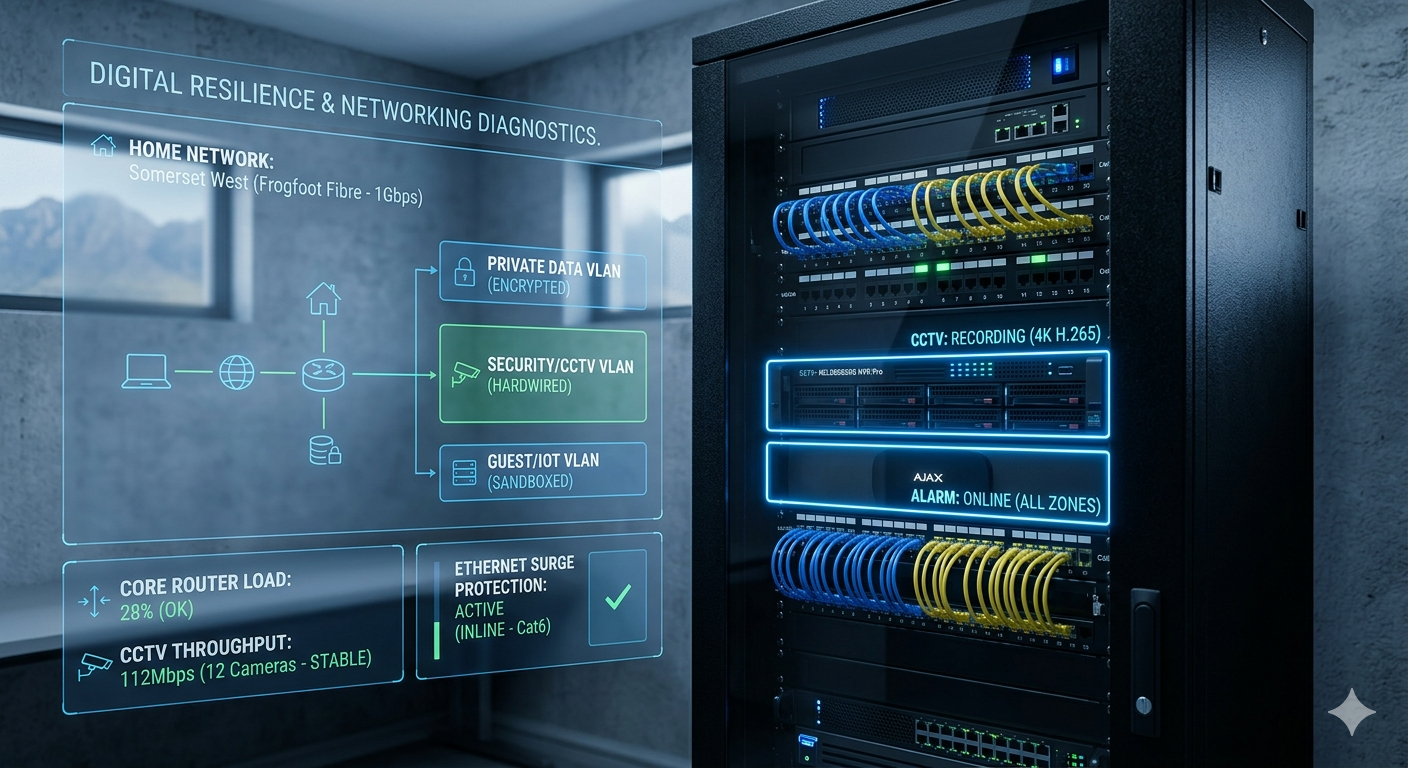
We implement VLAN (Virtual Local Area Network) Segmentation. We divide your home network into three distinct, isolated lanes:
- The Private Lane: Reserved for your computers, banking, and sensitive work data.
- The IoT/Security Lane: For cameras, alarm hubs, and smart appliances. These devices can “talk” to the internet to send you alerts, but they cannot “see” your private computer.
- The Guest Lane: A sandboxed environment for visitors and domestic staff, ensuring they have internet access without any visibility into your home’s internal systems.
4. Surge Protection for Data: The Hidden Entry Point
Homeowners in Somerset West are generally good about plugging their TVs into surge-protected strips. However, they often forget that a power surge—especially one triggered by lightning or a “grid-on” spike after load-shedding—doesn’t just travel through the electrical plug.
The Ethernet Path
A surge can travel down your copper Ethernet lines or even through the metallic shielding of a fibre drop-cable. We’ve seen entire CCTV systems fried because a surge entered through an outdoor camera and travelled back through the data cable into the NVR, destroying the motherboards of every connected device.
We install Inline Data Surge Protectors at the point where outdoor cables enter the building. It is a small investment that protects tens of thousands of Rands in networking and security gear.
5. The “Digital Health” Audit
Before you add another camera to your system, you need to perform a 3-step audit of your digital backbone:
- The Perimeter Ping Test: Take a laptop to your furthest gate or boundary wall. Run a sustained “ping” test to your router. If you see “Request Timed Out” or latency spikes over 100ms, your Wi-Fi is too weak to support a reliable security camera.
- The Throughput Check: Turn on every TV in the house to a 4K stream. Now, check your camera feeds. If the cameras start stuttering or dropping frames, your router’s processor is failing under the load.
- The Cable Integrity Check: Inspect any exposed outdoor data cables. In the Helderberg sun, standard PVC cable jackets become brittle and crack, allowing moisture to “wick” inside the cable and cause slow, intermittent data failures. (We only use UV-stabilized, Outdoor-Grade Cat6).
Technician’s Rule: The 30% Rule
Never load a Wi-Fi channel beyond 30% of its theoretical capacity if it is carrying security traffic. If a Wi-Fi 6 node is rated for 1200Mbps, do not expect it to handle more than 400Mbps of actual, stable, real-time security video without dropping packets. Always over-spec your bandwidth.
Conclusion: Engineering the Digital Fortification
In 2026, a security installer who doesn’t understand networking is a liability. Your home’s safety is now inextricably linked to your home’s connectivity. By building a “Digital Backbone” based on Cat6 cabling, VLAN segmentation, and professional-grade routing, you ensure that your security system is always online, always fast, and always private.
At The Security Centre, we don’t just “hang cameras.” We are systems engineers who build the digital fortifications required for a modern, connected lifestyle.
Is your Wi-Fi the weak link in your security chain? Contact us today for a Network Resilience Audit. Let’s get your digital plumbing sorted before the next storm hits.